Moving off WordPress without losing your rankings
Your rankings belong to your pages, not to WordPress. Here's the order to move in so they come with you, and why a move done now can leave you better off than before.
On this page+
You've outgrown your WordPress site. The one thing stopping you from replacing it is the fear of losing the Google rankings it took years to build. Here's the short answer. Those rankings aren't WordPress's to keep. They belong to three things: your page addresses, the words on those pages, and the links other sites have given them. Carry those three across properly and the rankings come with you. Do it well and you can come out ahead, because the new site won't have the plugin pile that was holding the old one back.
This post is the order to do it in. The redirect map comes first. Then the rest of the move, step by step, what comes with you from WordPress, what to expect after launch, and a checklist to hand to whoever does the work.
Why your rankings survive a move
When Google or Bing decides where your website shows up, it looks at your pages one at a time. A page earns its spot with three things.
- Its address. The bit after your domain name, like
/emergency-plumbing. - What's written on it. The headings, the words, the answers.
- Who links to it. Other websites that point at that page.
None of the three is a WordPress feature. Google's search team has said there's no fundamental difference between mainstream platforms as far as search is concerned, and that pages written as plain files, with no platform running behind them, do just as well. Nothing against WordPress. It publishes and it's flexible. It just doesn't own your rankings.
So the risk isn't where you're going. It's whether every old address still leads somewhere after the move. A page that keeps its address, or whose old address is redirected to its new one, keeps its place. An old address that now leads nowhere loses it. Redirects are what remove that risk, and the map is how you make sure there's one for every page.
This post says Google and Bing, both, on purpose. Bing handles nearly 9% of US searches on its own, and it supplies the index that ChatGPT's web search and Microsoft's Copilot draw on. Tell Bing about the move and you've told the AI answers too.
The biggest factor: your redirect map
A redirect is a note left on an old address. It says "this page lives here now" and sends people and search engines to the new page automatically. Type in the old address, land on the new page, never notice.
A redirect map is the list of those notes. It's a spreadsheet with three columns: the old address, the new page it goes to, and the title and description that page carries. For a typical local service site it's 30 to 80 rows. Getting every row right is the job.
The map is also what lets you change your addresses. You don't have to keep /2021/03/water-heater-tips/ because WordPress gave it to you. You can call the new page /blog/water-heater-tips, or anything clearer, and point the old address at it. Google and Bing follow the note, the visitor lands on the right page, and the ranking moves with it. Better addresses on the new site, nothing lost from the old one.
Where the old addresses come from
Start with a crawl. A crawler is a free program that visits every page on your site the way a search engine does and writes down what it finds. Screaming Frog's SEO Spider is the standard one, and its free version crawls up to 500 addresses, which covers most local business sites. Point it at your old site, wait a few minutes, and export the Internal tab. You get one spreadsheet with every address and, on the same row, its title, its description and its main heading. That spreadsheet is the first draft of your map.
A crawler only finds pages that are linked from somewhere, so add three more lists:
- Google Search Console, the Pages report. Every address Google has indexed, and which ones get clicks.
- Bing Webmaster Tools, the same on the Bing side.
- Your analytics, sorted by visits over the last year. The pages people actually use.
If you never set up Search Console or Bing Webmaster Tools, set them up now, before the move. Search Console starts collecting from the day you add the site and takes a few days to show anything, and Bing Webmaster Tools can import your site straight from Search Console and verify it for you. While you wait, Ahrefs Webmaster Tools is free for a site you own and shows which pages get organic traffic and who links to them.
Which rows matter most
Sort the list before you map it. Two kinds of page go to the top. Pages that other sites link to, which Search Console shows under Links, "Top linked pages": a supplier's directory, the local paper, a trade association. That kind of link takes years to earn and one missed redirect to lose. And pages that bring in enquiries, which your analytics or your contact form will tell you. Those rows get a careful, one-to-one match. The tag page for "uncategorised" does not.
What "with the metadata" means
Every page has a title and a description that don't appear on the page itself. They're the blue link and the grey line under it in a search result. If you have an SEO plugin like Yoast or Rank Math, that's where you wrote them, and the plugin put them into each page's code. That's why the crawl picked them up: they're already in your spreadsheet, one row per page. Carry each one to its new page, the same or better, never different. They're part of what earned the page its position.
Every ranking anyone has ever lost in a move comes down to an old address that was left pointing at nothing.
Here's what four rows of a finished map look like. The addresses are made up; the shape is the point.
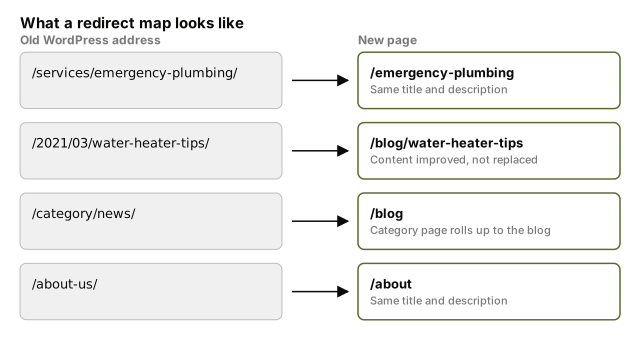
This is the shape we build for every site at Mintygo: every existing address mapped, the redirects carried across, the content and metadata kept intact. Anyone building your new site should be able to show you theirs before launch day.
The rest of the move, in order
The map is step one. Here are all six.
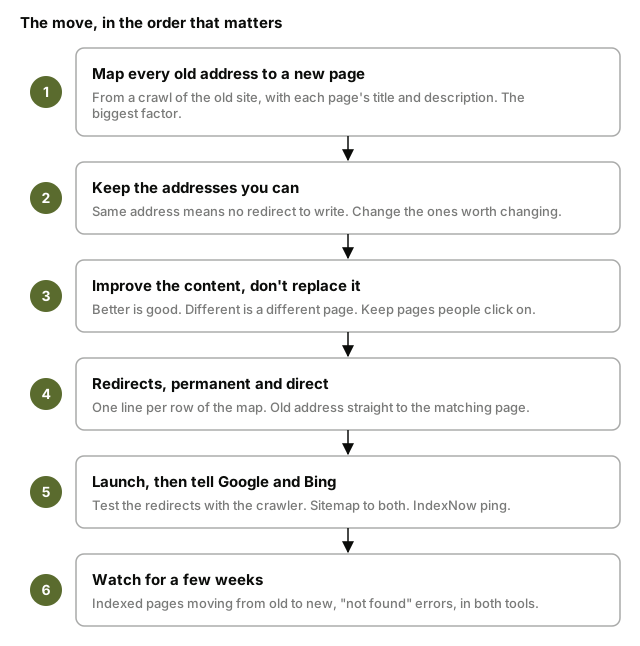
2. Keep the addresses you can
A page that keeps its exact address needs no redirect at all. Google and Bing come back, find it where they left it, and carry on. So before the map gets long, ask which addresses can simply stay. /emergency-plumbing can stay. /about can stay. The ones worth changing are the ones WordPress gave you by default: dated blog posts and category pages you never chose to have. Google's guidance is built around changing as little as you can at once. What done looks like: most rows in the map say "same", and the ones that don't have a reason.
3. Improve the content, don't replace it
A new site feels like a fresh start, and it's tempting to rewrite everything. Two rules keep you safe.
Improving a page helps. A clearer heading, a straighter answer to the question customers always ask, a paragraph on the thing your competitors never mention. The address is the same, the subject is the same, and the page usually ranks better for it. Replacing a page hurts. If the words, the headings and the subject all change at once, Google and Bing see a new page at an old address and start from scratch.
And never delete a page people click on. A redesign makes it easy to bin old posts and thin service pages without looking. Sort your analytics by visits first. The 2021 water heater post that looks like clutter might be bringing in a call a week. Google's line is change only one thing at a time: the platform now, the content later, once you can see the rankings held. What done looks like: every page in the top half of your analytics has a row in the map, and none of them says "delete".
4. Redirects, done right
On a site served as plain files there's no plugin for redirects and no settings page. The whole map becomes one short text file that goes live with the site, one line per row: the old address, the new address, and the code that makes it permanent. Your web developer writes it from your spreadsheet and can show it to you.
Each line has to be three things: permanent, direct and specific. Permanent means a 301 or 308, the two codes that tell a search engine "show the new address from now on". A temporary redirect keeps showing the old one, which is the opposite of what you want. Google's engineers have said plainly that permanent redirects don't lose ranking value.
Direct means one jump. The old address goes straight to the new page, not to a holding page that then goes to the new page. Chains slow everything down, and Google gives up after a few jumps.
Specific means the matching page. Sending every old address to the homepage is the lazy fix, and Google treats it as a soft 404: a page that says "found" while meaning "gone". If there's honestly no matching page, redirect to the closest one, or let the address return a proper "not found".
Then leave them alone. Google says keep redirects at least a year. Bing says one to two years, preferably longer. They cost nothing on a site like this, so keep them for good. What done looks like: every changed row in the map has a line in the file.
5. Launch, then tell Google and Bing
Before the switch, the new site lives somewhere private, which developers call staging, and four things get checked there. The new pages link to each other by their new addresses, not the old ones; Google's instruction is to update the internal links rather than lean on redirects for them. Your images and PDFs have been copied across, because their addresses get traffic too. Each page carries a line in its code naming its own address as the one to index, called a canonical tag. And nothing is still marked "don't index" from development.
Then test the redirects properly, not by typing addresses in one at a time. The same crawler has a list mode: paste in every old address, and its report shows where each one lands, how many jumps it took, and any that are temporary by mistake. Every final destination should be the page you meant.
Flip the site over, then tell both engines. Submit the new sitemap, the file listing every page on the new site, in Google Search Console and in Bing Webmaster Tools. Then IndexNow: a free ping, run by Microsoft, that tells Bing and a few other engines the moment an address is added, changed, redirected or removed. After a migration you can submit every address at once, redirected ones included. Setup is a small key file on the site and one request. Bing also has a Site Move tool under Configuration in Bing Webmaster Tools for telling it you've redirected within the same site. It speeds Bing up. It doesn't replace the redirects, and Bing says so. What done looks like: two sitemaps submitted, one IndexNow ping sent, one Site Move filed, all on launch day.
6. Watch for a few weeks
Open Search Console and Bing Webmaster Tools every couple of days and look at two things. The count of indexed pages, which should be draining from the old addresses and filling up on the new ones. And the "not found" list, which is where a missed row in the map shows itself. Google's site move guidance points you at the Index Coverage and Sitemaps reports for this. Bing's team suggests watching daily for about three months.
When an old address returns "not found", Google drops that address from its index and that's all. It doesn't mark the rest of your site down for it. A stray 404 is a missed redirect to fix, not a penalty. What done looks like: the not-found list is empty, and the indexed count has settled at roughly the number of pages you meant to keep.
What comes with you from WordPress
WordPress has an export button, under Tools. It gives you one file, in a format called XML, holding your posts, pages, categories, tags, comments, custom fields and users. That's your content. Two things aren't in it, and both are fine.
Your images and PDFs aren't in the file. They're copied across as a separate job, and any competent build includes it. Your SEO plugin's titles and descriptions aren't in it either, but you already have them: they're in the crawl spreadsheet from step one, which is where they go into the map.
What to expect after launch
Many moves done this way see no dip at all. The redirects are in place on day one, the search engines follow them, and the rankings carry straight over. Some moves see a short dip while Google and Bing recrawl the old addresses and work out what went where, and nobody honest will promise you which you'll get. Google's guidance is that on a medium-sized site it can take a few weeks or more for the new addresses to take over in results. Bing's is that the authority moves once it has recrawled a critical mass of the old addresses, which is what the sitemap and the IndexNow ping hurry along.
If a page doesn't come back, the map is the first place to look: a row left out, a redirect pointing at the wrong page, a batch sent to the homepage. Those are fixable in an afternoon. And the pages that come through arrive on a site with no plugin pile in front of them: faster, plainer, easier for Google and Bing to read. That's why sites that move well tend to come out ahead rather than level.
The upside of moving now
Search is changing under everyone's feet. Google answers more questions itself now, in the AI Overviews at the top of the page, and more people ask ChatGPT or Claude and never open a search engine at all. If your rankings have felt shakier this year, that's a big part of why, and it's happening to sites nobody has touched.
That's the case for moving now rather than next year. ChatGPT's web search draws on Bing's index, and Microsoft's Copilot is Bing. A site Bing has indexed cleanly after the move, with fast pages and a plain structure, is a site those answers can find and quote. Bing Webmaster Tools now shows you which of your pages Copilot has cited, which is the nearest thing to a scoreboard for this that exists.
Most WordPress sites aren't set up for that out of the box. Getting them there means adding more plugins, and if you've read our post on why sites are slow, you know where that ends. A site rebuilt cleanly is ready without them. The longer you wait, the more of your competitors will have done something about it.
Do it yourself, or hire someone?
If the steps above feel manageable, you can do this yourself. The crawler is free, the map is a spreadsheet, the redirects are a short file, and both webmaster tools cost nothing.
If it doesn't feel manageable, that's a fair signal too. Hire someone who has done it many times, and hand them the checklist below. Three questions will tell you quickly whether they have:
- Can you show me the redirect map before launch, with the titles and descriptions on it?
- Which of my pages get the most visits and the most links from other sites, and what happens to those?
- How will you test the redirects, and what are you watching in Search Console and Bing for the month after?
Good answers are specific. Vague ones mean the rankings are being left to luck.
The checklist
- Crawl the old site and export every address with its title and description
- Add the addresses from Search Console, Bing Webmaster Tools and analytics
- Mark the pages with links from other sites and the pages that bring enquiries
- Map every old address to one new page
- Carry each page's title and description across, the same or better
- Keep every address you can unchanged
- Improve content on the pages you touch; don't replace it wholesale
- Keep every page people click on
- Write the redirects file: permanent (301), straight to the matching page, never the homepage
- On staging: internal links use the new addresses, images and PDFs moved, canonicals set, nothing marked "don't index"
- Test every redirect with the crawler in list mode before the switch
- Submit the new sitemap in Google Search Console and Bing Webmaster Tools
- Ping IndexNow with every address, and file Bing's Site Move
- Watch indexed pages and "not found" errors in both tools for a few weeks
- Leave the redirects in place for years
Common questions
Will I lose my Google rankings if I switch from WordPress to something else?+
Not because you switched. Google says there's no real difference between mainstream platforms for search. Rankings are lost in the move itself, almost always because old addresses were left pointing nowhere. Map every address to a new page and set permanent redirects, and the rankings follow.
Do I have to keep the same URLs when I move?+
No. You can give pages better addresses on the new site. What matters is that every old address has a permanent redirect to the right new page, so people and search engines land where they should. Keeping an address unchanged is simplest, but it isn't required.
How long do I keep the redirects up?+
Google says at least a year. Bing says one to two years, and longer if you can. On a site with no database behind it they cost nothing to keep, so keep them for good.
Do I lose my backlinks if I leave WordPress?+
No. Links from other sites point at addresses, not at WordPress. Keep the address, or redirect it permanently to the new page, and the link still counts. That's why pages with links from other sites go at the top of your map.
Should I redesign the site at the same time as moving it?+
A new look is fine, and improving the content on a page helps. What hurts is deleting pages people click on, or replacing a page's content wholesale, because to a search engine that's a different page. Google's advice is to change one thing at a time.
Do I need to tell Bing as well as Google?+
Yes. Bing is the second search engine in the US and its index is what ChatGPT search and Copilot use to find pages. Add your site to Bing Webmaster Tools, submit your sitemap there, and use IndexNow to ping it the moment your addresses change. It takes minutes.