Why is my website so slow? A plain-English guide for business owners
Most slow small-business sites are slow because of the code the platform loads before your content ever appears. Here's how to check yours in two minutes, what it's costing you, and what to do about it.
On this page+
Most slow small-business websites are slow for the same reason: the platform loads a pile of code before your content, and the popular fixes sit on top of that pile rather than removing it. It's rarely something you did wrong. This post explains how to check your site in two minutes, what slowness actually costs you, the five culprits in the order to check them, and how to tell whether your site is worth patching or has hit its ceiling.
What "slow" actually means, and how to check in two minutes
Google runs a free test on any website called PageSpeed Insights. Type in your address, wait a minute, and it gives you a score out of 100 and a list of what's dragging it down. Two things to know before you read it.
First, look at the phone result, not the desktop one. Google ranks your site on how it behaves on a phone, and most of your visitors are on one.
Second, the report shows two kinds of data. At the top is what real visitors experienced over the last 28 days, which Google calls field data. Below that is a single simulated load on a mid-range phone, which it calls lab data. The real-visitor data is what Google uses. The lab score is useful for finding problems, but it's not your grade.
The real-visitor section is built on three measurements Google calls Core Web Vitals. In plain words:
- Largest Contentful Paint is how long until the main thing on the page shows up. Good is 2.5 seconds or less.
- Interaction to Next Paint is how quickly the page responds when someone taps something. Good is 0.2 seconds or less.
- Cumulative Layout Shift is whether things jump around while loading. Good is a score of 0.1 or less.
Green means good, orange means needs improvement, red means poor. If your loading time is orange or red on the phone view, your site is slow, and the rest of this post is for you.
What a slow site costs you
A bounce is not an enquiry
Two different things get measured in speed research, and they're often mixed up. A bounce is a visitor who leaves without doing anything. A conversion is a visitor who does the thing you wanted, which for a local business is an enquiry, a call or a booking. Bounces come first: someone who leaves before the page appears can never enquire.
Three findings, each measuring something different:
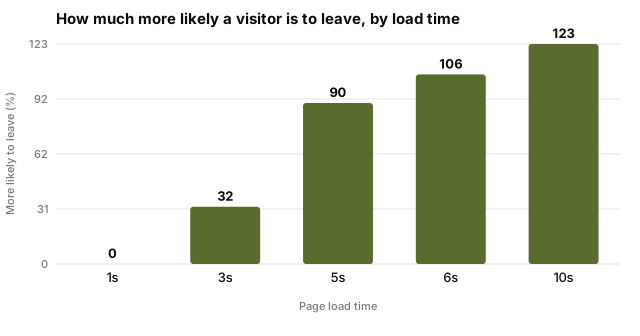
- Google's 2016 research found that 53% of mobile visits are likely to be abandoned if the page takes longer than 3 seconds. That's a bounce figure. Google's follow-up benchmarks a year later put numbers on the curve: compared with a 1-second page, the chance of a visitor leaving rises 32% at 3 seconds and 90% at 5 seconds. Google has since taken that page down, but the figures were widely reported at the time.
- A study Google commissioned from Deloitte in 2020 looked at conversions instead. Making a mobile site just 0.1 seconds faster raised conversions by 8.4% for retail sites and 10.1% for travel sites. On lead-generation sites, the kind where someone fills in a form, 21.6% more visitors made it to the form page.
- Akamai, which delivers a large slice of the web's traffic, found in 2017 that a 100-millisecond delay cut conversions by 7% across roughly 10 billion visits to big online shops.
The Deloitte and Akamai numbers come from large retailers with millions of visitors, so don't expect them to map one-to-one onto a plumbing site. The shape of the finding is what matters: every fraction of a second costs something, and it starts costing well before the page feels slow to you.
A worked example
Take a plumber with a site that gets 2,000 visits a month, mostly from phones. Three in every hundred visitors who see the page get in touch, and an average job is worth $350. The site takes 5 seconds to load on a phone.
Google's figure says more than half of visits past 3 seconds are likely to be abandoned. Be cautious and assume a faster site would keep just half of those people, so 530 more visitors a month actually see the page. At 3 in 100, that's 16 more enquiries a month, or about $5,600 in work. Over a year, that's the price of a new site several times over.
This is an estimate built on stated assumptions, not a promise. Your numbers will differ. Put your own visitors, enquiry rate and job value into the calculator on our homepage and see what it says for you.
The five usual culprits, in the order to check them
The order matters. It runs from most likely and cheapest to fix, to least likely and most expensive. Work down the list and stop when you find it.
1. Oversized images
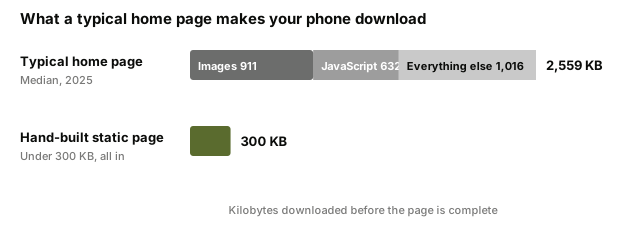
The single biggest thing on most pages. The median home page in 2025 made a phone download 2,559 KB, and 911 KB of that was images. A photo straight off a camera can be a few megabytes on its own, and a page with six of them is finished before it starts.
How to spot it: the PageSpeed report lists "properly size images" or "serve images in next-gen formats" near the top. What fixing it involves: resizing photos to the size they're shown at, and saving them in a modern format. Most platforms have a plugin or setting that does this. Does the fix last? Yes, for those images. Every new photo you upload has to be handled the same way.
2. Plugins, scripts and page-builder code
This is the code you never asked for. Every plugin, tracking script, chat widget and booking embed adds its own files, and most of them load on every page whether that page uses them or not. The median mobile home page carries 632 KB of JavaScript across 22 separate script files. JavaScript is the code that has to be downloaded and then run by your visitor's phone before the page settles, and running it is slower than downloading it.
How to spot it: "reduce unused JavaScript", "reduce JavaScript execution time" and "eliminate render-blocking resources" in the report. What fixing it involves: an honest list of every plugin and script, and removing the ones you don't use. Does the fix last? Partly. The ones you keep still load everywhere, and the next plugin you add starts the cycle again.
3. A heavy theme or page builder
Themes and page builders sell themselves on features: sliders, animations, mega menus, icon packs. You use two or three. The code for all of them loads anyway. This is the same problem as plugins, but it's built into the foundation, so it's harder to remove.
How to spot it: the same warnings as above, but they don't improve much when you remove plugins. What fixing it involves: switching to a lighter theme, which is a real job and often means a redesign. Does the fix last? Only until the next builder update.
4. Cheap shared hosting
Shared hosting means your site lives on a server with hundreds of others, and it's only as fast as the busiest one. Before any of your page loads, the server has to respond, and on a cheap plan that alone can take a second or two.
How to spot it: the report shows a slow "server response time" or "time to first byte". If that number is small, hosting isn't your problem, and upgrading won't help. What fixing it involves: a better plan, typically a few dollars a month more. Does the fix last? Yes, but it only fixes the wait before your page starts loading, not the weight of the page itself.
5. No caching, and why caching is a patch
Caching means the server keeps a ready-made copy of each page instead of building it fresh for every visitor. On most platforms it's a plugin or a switch, it's free, and it's the first thing anyone will tell you to try. Try it.
Then understand what it did. Caching makes the server hand over the heavy page faster. It doesn't make the page lighter. Every plugin, script and builder file is still there, and your visitor's phone still has to download and run all of it. It's preloading the slow thing, not fixing it. That's why sites with caching plugins still score orange.
Why the fixes keep wearing off
If you've done the list above and found yourself back at orange six months later, you're not doing it wrong. You're fighting the platform you built on.
The data on this is unusually clear. HTTP Archive, a project that measures millions of real websites, tracks how many sites on each platform pass Google's Core Web Vitals. In late 2025, 46% of WordPress sites passed on mobile, the lowest of any major platform, and nearly 40 points behind the best. WordPress's weakness is loading, not responsiveness. That is, the problem is how much the page carries, not how the software runs once it's there.
It's worth being fair about why. WordPress itself is a small, capable piece of software, and it runs about 40% of all websites, and nearly 60% of those built on a content management system, the software you log into to edit a site. What makes a WordPress site slow is what gets stacked on top: the theme, the page builder, the plugins, the hosting. The same logic applies to Wix, Webflow and Squarespace. They carry their own builder code on every page, and you can't remove it because it's the product. Whatever platform you chose, every fix you make is a fight against weight you didn't add and can't take out.
Google is candid about how much this matters. Its Core Web Vitals are used by its ranking systems, and it says plainly that the most relevant page still wins even with a poor experience. For a local business, though, the pages competing for "plumber near me" are all relevant. Speed decides between them.
Every fix you make is a fight against weight you didn't add and can't take out.
There's a reason people accepted this trade for so long: a site built by hand, without a platform, cost too much for a small business. That's no longer true. AI has cut the cost of hand-building a site to a fraction of what it was, which is a post of its own.
Patch it or replace it?
Start cheap. Resize your images and remove the plugins you don't use: both are free and an afternoon's work. Turn on caching. If the report blames server response time, move to better hosting for a few dollars more a month. For a lot of sites, that's enough to go from red to orange, and sometimes from orange to green.
Then look at what's left. If you're on a page builder with fifteen or twenty plugins on a shared plan, and you're still orange after the cheap fixes, you've found the ceiling. Swapping the theme might buy you a little, at the cost of a redesign, and you'll still be on the same stack.
The alternative is a site with nothing to load before the content: plain pages, built by hand, with no plugin layer and no builder underneath. Those pages come in under 300 KB and score 98 or above on every build, because there's nothing standing between the visitor and what they came for. Whether that's the right move depends on how much the cheap fixes got you and how much the lost enquiries are costing. You now have the numbers to work that out.
Common questions
How fast should a website load?+
Google's own target is that the main content appears within 2.5 seconds for most visitors on a phone. Past 3 seconds, Google's research says more than half of mobile visits are likely to be abandoned. Under 2 seconds is where you want to be.
Why is my website slow on mobile but fine on my laptop?+
Your laptop has a fast connection and a fast processor, so it hides the problem. A phone on a mobile signal has neither, and it has to download and run everything your site sends. Google ranks you on the phone experience, so that's the one to test.
Do plugins slow down a website?+
Usually, yes. Each plugin adds its own code, and most load it on every page whether that page needs it or not. Twenty plugins is twenty sets of files before your content. Removing the ones you don't use is one of the cheapest fixes there is.
Does a slow website affect my Google ranking?+
Yes, but less than the content does. Google says Core Web Vitals, its speed measurements, are used by its ranking systems, and that the most relevant page still wins even if it's slow. Speed decides between pages that are otherwise similar, which for a local business is most of them.
Can a slow website be fixed, or do I need a new one?+
Try the cheap fixes first, in this order - resize images, remove unused plugins, add caching, then look at hosting. If the score is still orange or red after that, the weight is in the platform itself, and a rebuild is the only fix that lasts.