PHP security flaw: what to do if your site runs on WordPress
A serious flaw in PHP, the language most WordPress sites run on, is being attacked. Most hosts have already fixed it. Here's how to make sure yours has.
On this page+
On 21 October 2026, the people who make PHP released a fix for two serious flaws in it, and attackers started trying them straight away. PHP is the language WordPress runs on, so if your website is on WordPress, it was in the firing line. The good news is that the fix happens on your host's server, and most reputable hosts have already applied it for their customers. It's still worth ten minutes today to make sure yours has, and this is how.
What is the PHP security flaw, and is my WordPress site affected?
It's a flaw in PHP itself, not in WordPress. Think of your website as a shop you rent. WordPress is everything you chose to put inside it: the shelves, the till, the sign above the door. PHP is the wiring behind the walls, and on most hosting it belongs to the landlord, your host. The fault was in the wiring, so every WordPress site running on an unpatched version of PHP was exposed, however well kept the shop was.
Security people have nicknamed it php2shell. Research teams at Wiz, OpenAI and Calif found it using AI, and the people behind PHP fixed it on 21 October. The researchers showed it working against WordPress without needing a password, and Amazon's threat team says it's now "being broadly exploited in the wild".
Wiz's own headline said it affects 70% of the internet. The figure behind that is W3Techs', which says PHP is used by 69.3% of the websites where it can tell which programming language runs behind them. That's how common PHP is, not how many sites are actually vulnerable.
It wasn't aimed at small businesses either. BBC News reported that the Finnish government, Edinburgh council and the BBC itself took pages offline while organisations raced to patch.
Who fixes the PHP security flaw, you or your host?
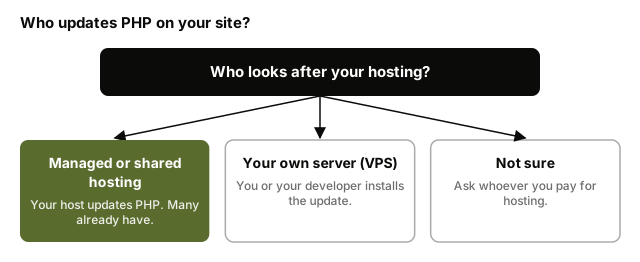
Whoever looks after the wiring, and for most small businesses that's the host.
If you pay a hosting company a monthly or yearly fee and it runs the server for you, which is how shared and managed WordPress hosting work, then your host updates PHP. The good ones did it without being asked. Hostinger says customers on every plan except a VPS have "nothing to do", because it manages PHP on those plans and has applied the fix to every server. Plenty of other hosts have done the same.
If you rent your own server, called a VPS (a private server you control yourself), the wiring's yours. You or your developer have to install the update and restart PHP.
If you're not sure which you are, look at who you pay for hosting and ask them. That's the whole job.
How do I check my WordPress site has the PHP security update?
Two checks and one email, and you'll know where you stand.
How to check your PHP version in the WordPress dashboard
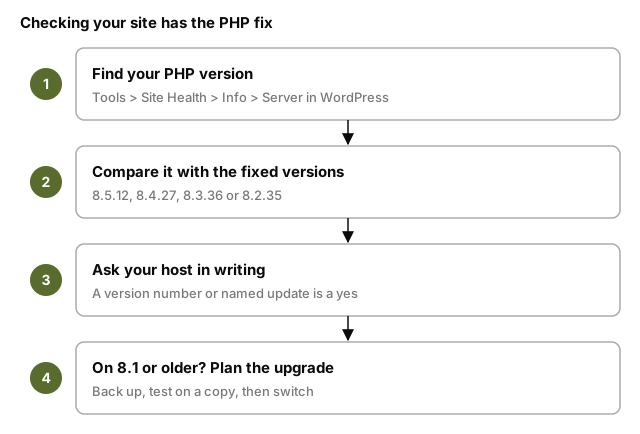
Log in to WordPress and go to Tools, then Site Health, then the Info tab, and open the Server section. WordPress's Site Health guide shows where everything is. Your PHP version is listed there, and most hosting control panels show it too.
PHP's fixed versions are 8.5.12, 8.4.27, 8.3.36 and 8.2.35. If your number is one of those, or newer on the same line, you're on a patched version.
What to ask your host
Send your host a short message asking whether the 21 October PHP security update has been applied to your site, and ask for it in writing. A good answer names something specific: a version number, or the name of the update they installed. "Our servers are secure" isn't an answer, and you're within your rights to ask again until you get one. If you have a developer who looks after the site, the same question goes to them.
Why an older-looking number doesn't always mean you're exposed
Some hosts install the fix through their own software packages, which can patch PHP without changing the version number WordPress shows you. Qualys, a security firm, points out that these builds "may keep an older upstream version number". So if your number looks old, don't panic, ask. The host's written yes is what counts.
What if my site is still on PHP 7.4, 8.0 or 8.1?
Then this is the bit that matters most for you, and it's fixable. PHP doesn't release security fixes for versions older than 8.2 any more, and Google's security team confirms there's no official fix for 8.1 or earlier this time. It's not a rare situation. On W3Techs' figures, 26.9% of sites using PHP are still on version 7, and 7.7% are on version 5.
Some hosts cover older versions themselves. Hostinger says sites on PHP 8.1 and older are still protected on its managed hosting. If yours can't say the same, the answer is to move up to a newer version, and 8.3 or above is the sensible target, since Hostinger notes PHP 8.2's security fixes end on 31 December 2026.
Upgrading PHP can occasionally break an older site, usually because a theme or plugin hasn't been updated in years. That's why keeping your plugins and theme current matters: a site that's up to date usually moves to a new PHP version without a hitch. Take a backup first, try the new version on a copy of the site, check your forms and logins work, then switch.
If none of that can happen quickly, the UK's National Cyber Security Centre says organisations that can't fix a system should "consider taking the system offline" until they can.
Will updating WordPress or a security plugin fix it?
No, and WordPress says so itself.
No WordPress update is required or planned for these issues.
That's from WordPress's own announcement on the day. The flaw is in the wiring, and WordPress is the shelves and the till, so a WordPress update can't reach it. A security plugin like Wordfence is a good lock on the front door, but this attack comes in through PHP before WordPress even starts, so the lock never sees it.
That doesn't mean you should switch either of them off. Your security plugin still does a job every day, stopping things like bots trying thousands of passwords on your login page. And automatic updates are what got most WordPress sites through July, when a different flaw, called wp2shell, turned up in WordPress itself. Security consultant Daniel Card told TechCrunch that those automatic updates were a big part of why most sites were patched quickly.
How do I know if my WordPress site was hacked before the fix?
Most sites won't have been. But a patch shuts the door, it doesn't throw out anyone who got in before it closed, so a quick look is worth five minutes.
In WordPress, check Users for any admin account you don't recognise. Visit your site from your phone and from a Google search, and look for pages you didn't write, or links that send you somewhere odd. Read anything from your host about malware, and if you use Google Search Console, Google's free tool for site owners, check it for a security warning.
If anything looks off, don't try to clean it up yourself. Ask your host or developer to check the server for files that shouldn't be there, and to change your passwords once it's clean.
How to keep a WordPress site safe from the next PHP security flaw
This one was found by teams using AI, and Wiz's researchers say plainly that "frontier AI models substantially reduced that barrier". Our view is that this works both ways: the people looking for flaws to fix and the people looking for flaws to use both have faster tools now, so there'll be more of these, and not just in PHP. PHP and WordPress have run a huge part of the web for a long time, and that's worth remembering. Older platforms simply need keeping up, and if you're staying on WordPress, these habits are the job.
If keeping on top of that list isn't something you want to do yourself, it's a small, regular job for a developer, and worth paying for.
Were Mintygo sites affected?
They weren't, and since we build websites for small businesses, it's fair to say why and to be clear that we have an interest. Our sites don't run on PHP. The pages are finished before anyone visits, with nothing running behind them, so there was nothing for our clients or their host to rush to patch this week. That doesn't make any website invulnerable, and we wouldn't claim it. It does mean far fewer moving parts to keep up. If you're curious what moving off WordPress without losing your rankings involves, we've written that up too, and if you'd like a site you don't have to watch the news for, tell us about your business.
Common questions
What is php2shell?+
It's the nickname for two serious flaws in PHP that were fixed on 21 October 2026. They let an attacker take over a website's server without logging in, which is why it's being treated as urgent. The fix is a PHP update on the server, done by your host or developer.
Do I need to update WordPress to fix the PHP security flaw?+
No. WordPress has said no update is needed or planned, because the flaw is in PHP, not WordPress. Keep WordPress updated anyway, but the fix for this one has to happen on your host's server.
Will Wordfence protect my site from the PHP vulnerability?+
Not from this one. Security plugins like Wordfence run inside WordPress, and this attack happens in PHP before WordPress starts. They're still worth having for everyday attacks like password guessing.
How do I upgrade the PHP version on my WordPress site?+
Most hosts let you choose your PHP version in the hosting control panel, or will do it if you ask. Back up first, update WordPress, your theme and your plugins, then test the site on the new version before switching the live one over. If that sounds like a lot, it's a short job for a developer.
Is my website safe if I'm with Hostinger?+
Hostinger says customers on every plan except a VPS don't need to do anything, because it manages PHP and has applied the fix. If you're on a Hostinger VPS, you run PHP yourself, so you or your developer need to install the update.